Differences - Find & Spot It
- 4.9
- Rating
- 10.00M
- Installs
- Free
- Price

 Analysis by App-foxy
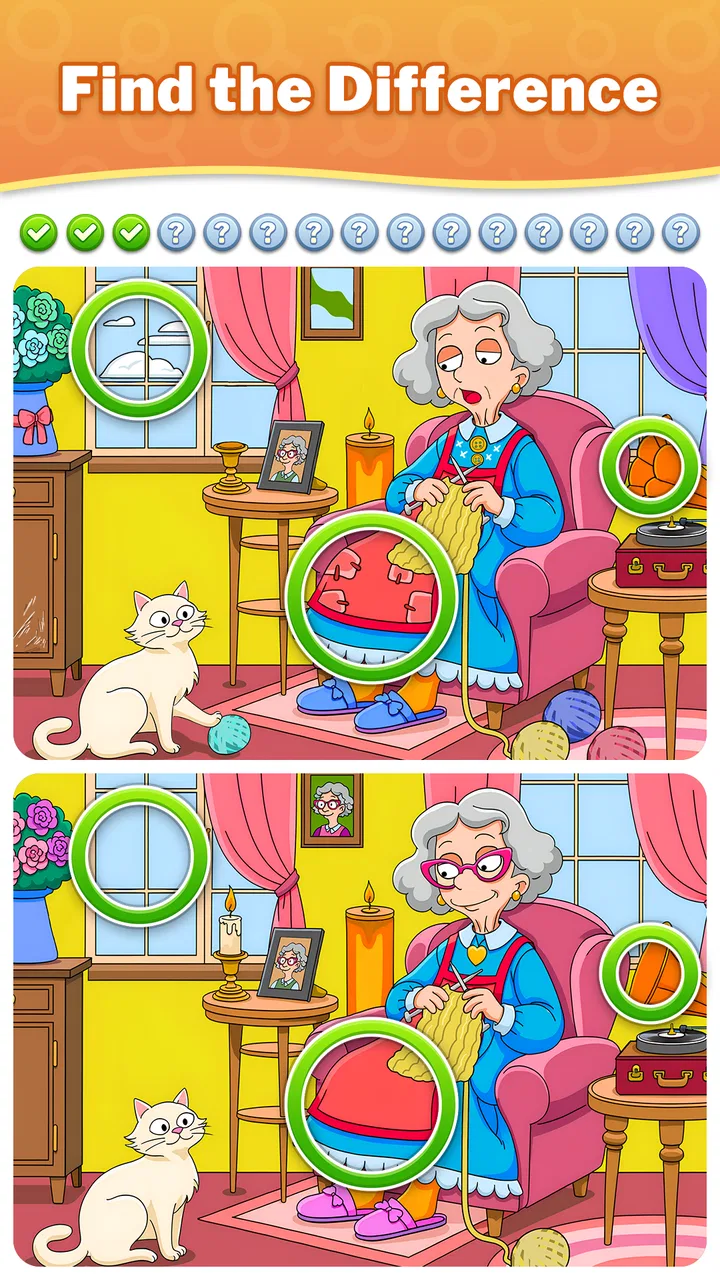
I noticed the appeal of Differences - Find & Spot It almost immediately: the first move is simple, but the picture keeps asking me to look again. I compare two images, tap a detail that seems out of place, receive feedback, and then decide whether I have enough focus left for another round. That small cycle makes this puzzle game easy to start during a spare minute and surprisingly absorbing when I want a longer, quieter break.
Developed by Guru Puzzle Game, it belongs to the familiar spot-the-difference side of the puzzle category. The store summary points to more than ten thousand pictures, which gives the game a broad sense of scale without changing its basic character. This is not a complicated strategy title with a long tutorial. Its pleasure comes from observation, patience, and the satisfying moment when a detail that was hiding in plain sight finally becomes obvious.
How the spot-the-difference loop feels in practice
I find the best way to approach a difficult image is to trade speed for a repeatable routine: compare the same region in each picture, then move on instead of chasing whichever detail looks most unusual. That makes it easier to notice when I’m stuck and take a brief visual break rather than tapping at random. The next section looks at how that simple method shapes the game’s rewards and its staying power.
You May Also Like

 Blood Strike: 2.5 Anniversary
Blood Strike’s Loadouts Turn Every Drop Into a Tactical Gamble
A close look at Blood Strike’s custom loadouts: how fast access to signature weapons reshapes its battle royale rhythm, rewards preparation, and narrows the gap between fights.

 Pandora - Music & Podcasts
Pandora’s Music Is Easy to Start, but Harder to Recover
Pandora’s strength is its low-effort path from a seed to a station. Its weak spot is how much confidence it asks you to place in connection, setup, and quiet recovery.

 8 Ball Pool
 Is Built on Rivalries, Rematches, and Routine
A close look at the rivalries, rematches, shared routines, and unanswered safety questions that turn a quick pool match into a persistent mobile community.

 Samsung Music
’s Quiet Strength Is Playing What You Already Own
Its reach comes less from spectacle than from dependable access to a personal library. That simplicity is both the app’s strongest retention engine and its ceiling.

 AccuWeather: Weather Radar
AccuWeather Review: A Quick, Clear Forecast for Everyday Decisions
For everyday plans, the best forecast is the one you can understand quickly. AccuWeather makes rain timing, radar, and local conditions easy to act on, with a few trade-offs.

 Hill Climb Racing
Why Hill Climb Racing Still Turns Crashes Into One More Run
A tiny car, a bumpy hill and one more upgrade: Hill Climb Racing keeps resurfacing because its simple chaos makes every near-miss feel personal.
More From Our News Desk



The first action is easy, but the screen quickly becomes demanding
Each round begins with a direct task: study the paired images and identify what has changed. I do not need to learn a complicated control scheme. My attention moves across colors, outlines, objects, and small areas of the scene, while each tap represents a guess. That immediate start is one of the strongest parts of the experience because there is very little distance between opening the game and actually solving something.
The simplicity also makes the game approachable for people who do not usually play puzzle games. A younger player can understand the objective quickly, and an adult can pick it up without having to remember rules from a previous session. The Everyone content rating fits that accessible presentation. At the same time, easy controls should not be confused with effortless puzzles. The challenge comes from visual comparison, not from managing buttons or complicated menus.
I found that the best first move is not to tap randomly. I scan both images in a fixed pattern, starting at the top and moving gradually toward the bottom. Then I compare matching areas rather than jumping between whichever detail catches my eye. This method reduces the chance of overlooking a difference simply because my attention keeps returning to the most colorful part of the picture.
That habit matters because spot-the-difference games can create a false sense of progress. Finding the obvious changes feels productive, but the final one is often hidden in a quieter area. I get better results when I treat the image like a visual checklist: sky, background, large objects, edges, small decorations, and repeated shapes. It is a modest technique, but it makes the game feel less dependent on luck.
Feedback keeps every tap meaningful
The game’s feedback rhythm is what turns looking into a proper play loop. A correct discovery gives me a clear sense that the search is moving forward. A wrong tap, by contrast, reminds me to slow down and inspect the scene instead of guessing. That immediate response creates a useful conversation between the image and my attention: I test an idea, receive a result, and adjust the next search.
I like this rhythm because it gives even a short session a beginning, middle, and end. I am not simply staring at two pictures with no sense of direction. Every successful observation narrows the remaining possibilities, while an unsuccessful attempt tells me that a different approach is needed. The feedback is especially helpful when I have been looking at the same area for too long and need to reset my eyes.
There is a trade-off here. Players who prefer completely consequence-free puzzles may find the pressure of making an incorrect tap distracting. I personally think a little tension improves the experience, but it means this is not the best choice if I want a purely meditative activity with no possibility of frustration. The game asks me to be attentive, and inattentive play usually feels less rewarding.
One practical tip is to pause briefly after finding a difference instead of immediately hunting for the next one. That short reset prevents me from carrying the visual shape of the previous discovery into the next comparison. When I rush, I tend to see patterns that are not really there. When I take a breath and begin the next scan from a new corner, the feedback loop feels cleaner and more reliable.
The reward is recognition rather than a complicated progression system
The main reward is the discovery itself. A small visual irregularity becomes clear, a tap confirms it, and the puzzle moves closer to completion. That may sound modest, but it is exactly why the game works well as a casual break. I do not have to invest in a story, build a character, or understand a large ruleset before receiving satisfaction. The reward arrives through my own attention.
This also gives the game a different flavor from many other mobile puzzle alternatives. A match-three game usually rewards quick combinations and chain reactions. A word puzzle rewards recall and language knowledge. A logic grid rewards deduction across explicit clues. Here, the useful skill is visual persistence. I am rewarded for noticing something small, not for acting quickly or calculating a solution.
That distinction makes it suitable for a few specific situations. I can use it when I want to shift away from reading, when I need a short mental pause between tasks, or when I prefer a puzzle that does not require sound or a long uninterrupted story. It also works as a shared activity: one person can inspect the left side while another watches the right, although competitive players may disagree over who spotted a detail first.
The broad picture library helps the reward remain repeatable. Even after I understand the basic mechanic, another image can provide a fresh visual problem. Still, the long-term appeal depends on whether I enjoy the act of comparison itself. If I need increasingly complex rules, elaborate progression, or a strong narrative reason to continue, the simple reward may eventually feel too thin.
There is also a useful distinction between completing a round and improving at the game. Finishing a puzzle gives immediate closure, while developing a better scanning method gives a quieter, longer-term reward. I recommend paying attention to that second layer. Once I stop relying on random taps and start comparing areas systematically, the game becomes less about waiting for luck and more about practicing observation.
Why another session begins after the puzzle ends
The reset is almost effortless. After completing a picture, I can put the game down without feeling that I have abandoned a complicated commitment. That makes it unusually friendly to fragmented time. A short wait, a coffee break, or a few minutes before bed can become a complete activity rather than an interrupted one.
At the same time, the clean reset is what creates the temptation to continue. One solved image proves that I can finish the next one too, and the unfinished search remains mentally present. I often begin another round because the previous one ended with a sense of closure, not because the game forced me into a lengthy sequence. The loop is: inspect, test, confirm, finish, and choose whether to start again.
This is where the game is more flexible than a traditional book of printed puzzles. A physical puzzle book can be satisfying, but it is less convenient to carry around and does not provide the same immediate response to a tap. On the other hand, a printed page can feel calmer and more permanent, with no digital distractions around it. I would choose this app for convenience and variety, while choosing paper when I want a screen-free activity.
Compared with a dedicated brain-training app, this game is narrower but more inviting. It does not ask me to rotate through memory, arithmetic, language, and reaction exercises. That focus is a strength when I specifically want visual searching, but it is a weakness if I am looking for a broad mental workout. The right alternative depends on the kind of effort I want: observation here, varied drills elsewhere.
There is another practical question: can someone play comfortably without becoming highly competitive? In my experience, yes, because the central pleasure is personal discovery rather than mastering a complex ranking system. However, the amount of patience required changes from image to image. A player who dislikes examining a busy scene for a stubborn final difference may prefer a faster casual game with more immediate actions.
Free access, optional spending, and the point where friction matters
The game is free to download and play, which makes it easy to try before deciding whether the format suits me. Optional in-app purchases range from $0.99 to $99.99 per item. That wide range is worth keeping in mind, especially for families or anyone who tends to make impulse purchases during a difficult puzzle. I would approach the store carefully and treat spending as optional rather than part of the basic reason to install the game.
For me, the important question is not simply whether a game costs nothing at the start. It is whether the free experience remains enjoyable when I do not spend. This title makes sense for a player who wants to sample its picture-search loop first and decide gradually. If I already know that I dislike hints, interruptions, or any form of purchase prompt in casual games, I would be more cautious and check the on-device purchase settings before handing the phone to a child.
The current version is 2.15.0, and the game runs on Android 7.0 or later. That makes compatibility straightforward for many Android users, though anyone with an older device should check the operating system before expecting to install it. The technical requirement is not part of the gameplay itself, but it matters when recommending the app to someone using an aging phone or tablet.
The audience size suggests that the format has broad appeal: it has passed ten million installs, with a 4.9 average from around 364 thousand ratings and roughly six thousand written reviews. Those figures do not replace personal taste, but they do indicate that the basic presentation has connected with many players. I would still judge it by the kind of puzzle I want, because popularity cannot make a visual-search loop enjoyable for someone who prefers action or story.
Who will enjoy it, and who should choose something else
I would recommend it to people who like calm concentration, visual details, and puzzles that can be completed in separate sittings. It is particularly suitable for someone who wants a low-learning-curve game with enough variety to support repeated sessions. It can also be a useful shared screen activity for a parent and child, provided an adult keeps an eye on optional purchases and the child is comfortable with the level of visual patience required.
I would not make it my first recommendation for players who need constant novelty in the controls. The action remains fundamentally the same: compare, locate, and confirm. The pictures can refresh that process, but the underlying task does not transform into something radically different. Likewise, players who prefer numerical logic, wordplay, or fast reaction challenges may find a more specialized puzzle app a better match.
People with visual strain should also be realistic about how they play. Searching for small changes can become tiring during a long session, especially when I hold the phone too close or keep staring without a break. I get a better experience by increasing comfort, changing my viewing distance, and stopping after a natural endpoint rather than forcing myself to solve one stubborn image. The game rewards patience, but patience should not mean ignoring fatigue.
A useful everyday scenario is a delayed appointment. Instead of opening a social feed and losing track of time, I can complete one picture, put the phone away, and return to whatever I was doing. If I have more time, I can begin another round without needing to remember a story or reconstruct a complicated position. That clear boundary is one of the reasons I find the game easier to control than open-ended entertainment.
My verdict on the complete loop
What makes this puzzle work is the balance between a tiny action and a meaningful result. I tap a suspected difference, the game tells me whether my observation was right, and each correct discovery brings the image closer to completion. Then the round ends cleanly, leaving me with a simple choice: stop satisfied or begin another search. The strongest feature is the clarity of that loop, not complexity.
Its limitations are equally clear. The core mechanic will not satisfy everyone, optional purchases deserve attention, and prolonged searching can become tiring. I would also avoid presenting it as a complete replacement for every type of puzzle game. It is best understood as a focused visual activity, one that chooses repetition and accessibility over elaborate systems.
After trying it, I see Differences - Find & Spot It as a good recommendation for a friend who wants a free, approachable way to exercise attention without committing to a long game. Guru Puzzle Game keeps the entry point simple, while the large collection of pictures gives the familiar task room to continue. I would start with short sessions, use a consistent scanning method, and decide carefully whether any optional purchase adds enough value for my own habits.
In the end, I return for the small moment when a hidden detail becomes visible. That moment supplies the action, the feedback, the reward, and the reason to reset for another round. If that kind of quiet visual challenge sounds satisfying, this is an easy game to try. If I want strategy, story, or rapidly changing mechanics, I would choose a different puzzle category instead.
FAQs for Differences - Find & Spot It
01What is the main objective of Differences - Find & Spot It?
Differences - Find & Spot It is a puzzle game where players are tasked with identifying differences between two seemingly identical images. The main objective is to enhance your observation skills by spotting subtle variations. Each level presents a new challenge with varying degrees of difficulty, ensuring engaging gameplay for puzzle enthusiasts.
02Is Differences - Find & Spot It suitable for all ages?
Yes, Differences - Find & Spot It is designed to be family-friendly, making it suitable for players of all ages. The game offers various levels that cater to different skill levels, from beginners to advanced players. Parents can enjoy playing with their children, making it a fun and educational experience for everyone involved.
03Does the game require an internet connection to play?
Differences - Find & Spot It can be played offline, which means you do not need a constant internet connection to enjoy the game. However, some features, such as updates or in-app purchases, may require internet access. This offline capability makes it perfect for on-the-go entertainment.
04Are there in-app purchases available in the game?
Yes, Differences - Find & Spot It offers in-app purchases that allow players to buy hints, remove ads, or access additional content. While the game can be enjoyed for free, these purchases can enhance the gameplay experience by providing extra resources or removing interruptions.
05How challenging are the puzzles in Differences - Find & Spot It?
The game offers a wide range of difficulty levels to accommodate different player skills. Beginners can start with easier puzzles, while experienced players can tackle more challenging ones. The complexity increases as you progress, providing a balanced mix of easy and tough puzzles to keep you engaged and entertained.
Pros
- Challenging levels enhance focus
- Beautifully designed visuals
- Offline mode available
- Regular updates with new content
- User-friendly interface
Cons
- Ads can be disruptive
- Limited hints available
- Some levels are repetitive
- In-app purchases can be costly
- Occasional bugs in gameplay

Differences - Find & Spot It
Gallery